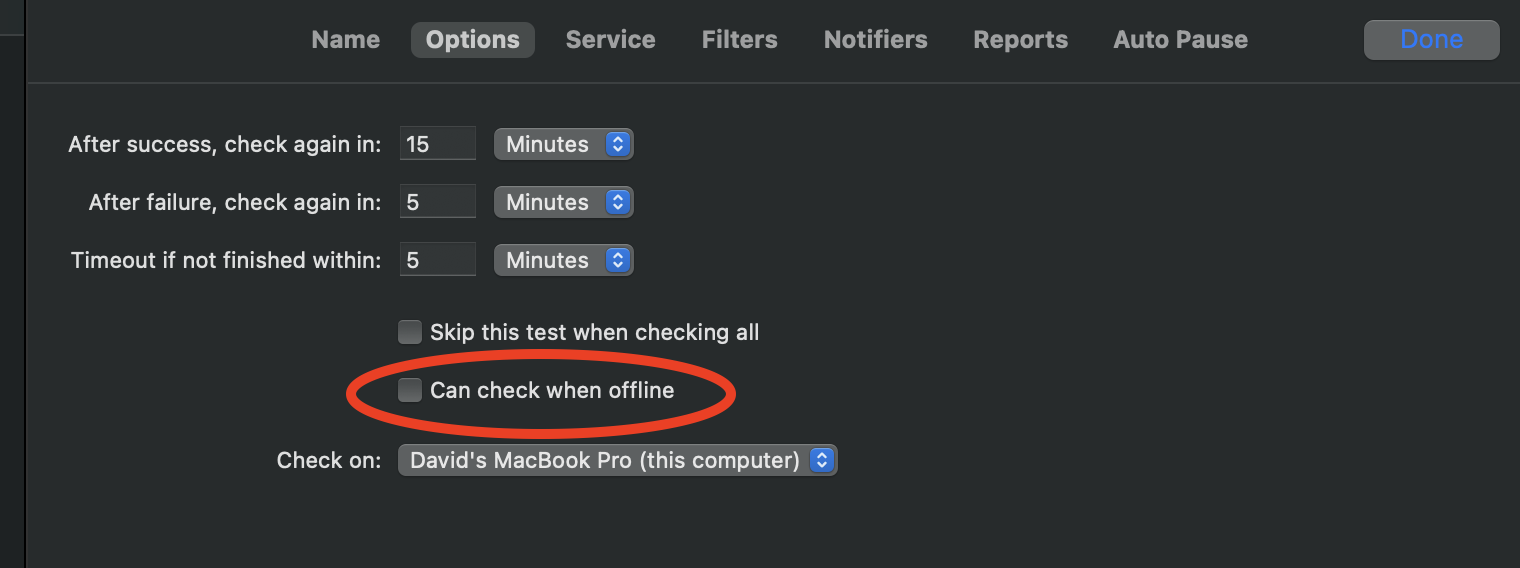
Simon's automatic offline support
· FAQ · Simon
Read More
· FAQ · Simon
Read More
· release · Simon
A second beta of Simon version 5.1 is now available. Version 5.1b2 just has a few improvements:
As a reminder, version 5.1 includes lots more changes since the previous release, including:
Read More
· FAQ · Simon
Read More
· FAQ · Time Out
The direct edition (available from this site), the Mac App Store edition, and the Setapp edition are very similar, but there are a few minor differences:
The direct edition can be downloaded from this site.
The Mac App Store edition can be downloaded from the App Store app.
The Setapp edition can be downloaded from the Setapp app.
The direct edition will download to your Downloads folder, so simply drag it into your Applications folder to install.
The Mac App Store edition will be downloaded directly into the Applications folder.
The Setapp edition will be downloaded…
Read More
· FAQ · Time Out
Look in your Dock and menu bar; does Time Out appear more than once?
If it's in the Dock more than once, you can long-click or right-click on the Dock icon to display the Dock menu for the app, then choose Options ▸ Show in Finder to reveal the app in the Finder. Do this for each to find the one that shouldn't be there — it could be in your Downloads folder, or in a subfolder of Applications if you installed both from the Dejal site and the Mac App Store.
Once you find the duplicate, quit that app (by double-clicking the app icon to bring it to the front, then press ⌘Q), then move it to the…
Read More
· FAQ · Time Out
Read More
· FAQ · Time Out
If no break appears when you manually start one, or as scheduled, there are a few possibilities.
To fix a permissions issue, try this:
Make sure Time Out is in your Applications folder.
Paste the following command into Terminal:
xattr -d -r -s com.apple.quarantine /Applications/Time\ Out.app
If this gives a permissions error (e.g.…
Read More
· FAQ · Time Out
Read More
· FAQ · Time Out
"Natural breaks" are when the Mac is not being used; idle.
By default, Time Out will wait briefly then count backwards when you are having a natural break, to give you credit for not using your computer.
If you do a lot of reading on-screen, that doesn't cause keyboard or mouse activity, you can change the app to disable this behavior by choosing Continue Countdown from the popup menu on the Break Appearance page of the settings.
Or if you'd prefer to have it just pause the countdown, instead of counting backwards, or reset the timer, those are also options.
Read More
· FAQ · Simon
You can quickly check any notifier in Simon by going to the Notifiers page, then choosing File ▸ Notify Now, or clicking the reload toolbar button when on that page.
Simon will perform the notification with placeholder variable values, so for the Email notifier, it will send the message, if set up correctly.
Read More
· FAQ · Simon
I seem to get more queries about the Email notifier than any other feature. Usually, it comes down to not filling in all of the fields, or setting the wrong authentication.
So the first thing I'd recommend is checking that both the To and From address fields are filled in with valid email addresses.
If that doesn't help, check that the Outgoing Mail Server is correct in the Email Transport Options panel — if you use iCloud, make sure you enter just "smtp.icloud.com" (without the quotes), and not the colon and username following.
If still not working, try each of the Authentication options in…
Read More
· FAQ · Time Out
Yes. I recommend that you always use the latest version of Time Out if you can, as it has the latest improvements and fixes. But if your Mac isn't using a recent OS version, you're curious what older versions were like, or you have some other reason to want an older version, they are still available. Just download the latest release that supports your OS version.
Read More
· FAQ · general
No, I’m a solo developer, so have limited time, and choose to focus my skills on platforms I use. I believe that Apple devices are the best computing platforms, so only write software for Macs, iPhones, and iPads.
I don’t have any significant experience with other platforms, so can’t recommend alternatives for them.
Read More
· FAQ · general
The name "Dejal" is pronouced "DEE-JILL". It is not a French word, so should not be pronounced as "DAY-ZHAL" or other variations.
The name originated from the former initials of the founder of the company, David Sinclair — me. I used to be David J. Lambert, but my wife and I both changed our surnames to "Sinclair" when we got married, being people who like to make our own conventions (and we chose that name in part after my first computer, the Sinclair ZX81). Anyway, back around 1983 I needed a password, so an obvious (if simplistic) choice was something based on my initials. D.J.L. with some…
Read More
· site
For the past decade or so, the Dejal blog has been powered by the Drupal content management system (CMS). But it recently stopped working. I've been meaning to replace it for a while anyway, since I use WordPress for my personal blog, Dejus, and my motorhome travel blog, Sinclair Trails.
So, I have now replaced the Dejal blog with a WordPress-based one.
Unfortunately, I don't think it's possible to recover my previous blog posts, though you can view them in the Internet Archive. Most of them were just announcing app update releases, and the release notes pages cover those to some degree (e.g.…
Read More