I’m pleased to announce the general release of Time Out version 3.1, a big update of my popular break reminder app for Mac. 🎉
This update includes several significant improvements:
- Added an option to keep a break displayed until you click a new End Break button, with an overtime counter showing how long the break has continued.
- Added several fun, appearance-aware menu bar icons, including symbols and activity shapes.
- Added Option-click on status item to show a quick menu of options for the next break and more.
- Added Make Due In submenu in break Options menu to change the due time of a break.
- Added Advanced options to hide or disable commands that could bypass a break.
- Added Messages for occasional tips, feature explanations, announcements, and invitations from Dejal, with brief non-disruptive appearances during breaks.
- Added optional Premium subscriptions and a Lifetime purchase, alongside the existing non-recurring Supporter options.
- Modernized the break display while retaining compatibility with existing themes.
- Breaks now wait for mouse or trackpad drag operations to finish before appearing.
- Added URL commands for postponing specific or all breaks by a custom interval.
- Added anonymous analytics to help improve the app.
- Includes several other minor improvements.
Like version 3.0, this update requires macOS Tahoe (26.0) or later.
Read on for full details.
New option to end a break when done


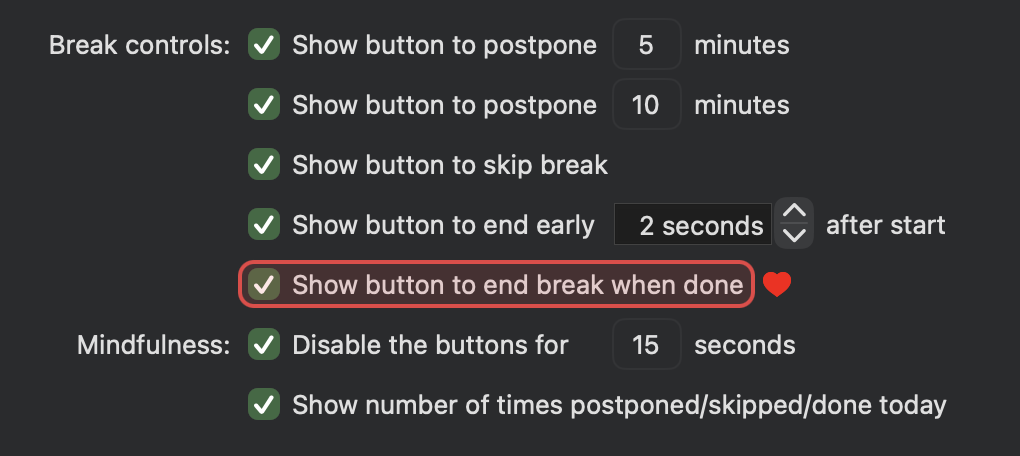
- Added a Show button to end break when done checkbox to the Break Appearance page.
- If enabled, when the break reaches its scheduled duration, it remains displayed instead of fading out automatically.
- The control panel shows an End Break button; click it when you are ready to finish the break.
- The left-hand time label continues to show the scheduled duration, while the right-hand label counts upward, e.g.
+35 seconds, so you can see how long the break has continued beyond its schedule. - Clicking End Break fades out the break as usual.
- This option is available as a new reward for recent Time Out supporters.
New icons for the menu bar status item

- Added several new icons for the menu bar status item, as fun indicators of Time Out breaks.
- Symbols include a palm tree, umbrella, leaf, cup, pause, and more.
- Activity shapes include walking, cardio, strength training, flexibility, etc.
- Unlike the app icon and break label icons, these will adapt to the current menu bar appearance.
Alternative status item menu

- Hold the Option key when clicking the menu bar status item to show a menu of useful commands for the next due break, while a regular click continues to show the window.
- This menu includes an item to show the Time Out window, several commands to start, postpone, skip, etc the next due break, and useful commands that apply to all breaks.
Quickly change when a break is due

- Added a Make Due In submenu to change a break to be due in 30 seconds, 1 to 10 minutes, 15, 20, 30, or 45 minutes, or 1 hour.
- This is equivalent to editing the due date in the Break Schedule page, so doesn’t count as postponing or skipping.
- It is also useful for testing Break Actions, to make them due soon.
- This submenu appears in the new alternative status item menu, and in each break’s Options menu in the sidebar.
Optionally hide commands that could bypass a break

- Added Advanced options to separately hide or disable the Make Due In, Reset, Disable, Delete, and/or Quit commands.
- These join the existing option to hide the Pause commands.
- These options make it harder to bypass breaks, for people who want a little extra help.
- These new options are available as a new reward for recent Time Out supporters.
Introducing Messages from Dejal


- Added a new Messages page in the settings window for occasional tips, helpful feature explanations, announcements, and invitations from Dejal.
- A brief message may sometimes appear as part of the control panel during a break; it won’t pause, extend, postpone, or otherwise change the break, and the complete message remains available in Settings.

- Click the message during a break to show the full message after the break ends.
- Or click the X next to the message (that appears when pointing at it) to dismiss the message.
- Unread messages are marked, and messages can be searched or marked as read.
- Messages can include a Show Me button, that takes you to the relevant settings page and highlights the control being discussed.

- As a new reward for recent Time Out supporters, options are available to disable messages, hide them during breaks, or exclude promotional messages.
- Time Out does not show third-party advertising; promotional messages are just very rare mentions of other Dejal apps that you might find useful.
Introducing an optional Premium subscription and Lifetime purchase
The Support Time Out page now has two new options: a one-time Lifetime Supporter purchase, and a button to switch to subscription options:

Clicking the View Premium Options button shows the auto-renewing subscription options, with a button to switch back to View Supporter Options:

- Added an automatically recurring subscription option, as an alternative to the Supporter options.
- It works like a normal subscription, unlocking all premium features while subscribed.
- Note that the subscription option is only available in the Mac App Store edition.
- The existing non-recurring Supporter options are still available in both the direct and App Store editions.
- You may not be offered one or the other, depending on your current supporter status.
- Also added a Lifetime purchase option, which keeps all current and future premium features available forever.
- The existing trial mechanism is unchanged; a trial will automatically start when any supporter/premium feature is used.
- Trials now more clearly highlight the options being tried with a red highlight.
- And of course the basic features of the app can still be used completely free.

Modernized the break display
- Rewrote the break display using SwiftUI, while retaining compatibility with all existing themes.
- The available control buttons are now always centered when some buttons are hidden.
- This modernization was the groundwork for the Messages and End Break enhancements.
Added anonymous analytics to help improve the app

- Added a checkbox to the Advanced page to control sending anonymous analytics to Dejal.
- This does not include any personally identifiable information, and doesn’t include any third-party trackers.
- It was written by Dejal to provide basic aggregated information like the major OS version and similar values, to help guide future improvements of the app.
But wait, there’s more!
- If the mouse/trackpad button is down when a break is due, it now waits until the button is released, to avoid interrupting a drag operation.
- Added support for URLs like
timeout://break/micro/postpone/2mandtimeout://postpone/2m, i.e. postponing a specific break or all breaks by a custom time interval. - Added support for a
timeout://scheduler/logging/onURL to turn on break scheduler diagnostic logging, andtimeout://scheduler/logging/offto turn it off again. Leave off unless instructed by Dejal. - Several other minor improvements.
Want to try it?
Note that Time Out requires a minimum of macOS Tahoe (26.0). If you are still using an older OS version, you can continue to use version 2.9.7 until you’re ready to upgrade your OS.
If you are using the Mac App Store edition, you can update via the App Store app.
Similarly, if you are using the Setapp edition, it will handle that update for you.
If you are using the direct edition, you can use the Check for Updates feature in the app to update.
Otherwise, download Time Out 3.1 now!
I hope you enjoy the many improvements in Time Out!
– David Sinclair, author